Lash EDI 810 Invoice: 9 Fields Before Retail Billing

Share
Lash EDI 810 Invoice: Direct Answer
A lash EDI 810 invoice is the supplier's electronic request for payment after goods are shipped or delivered. Before submission, reconcile the invoice number, purchase order, retailer item, quantity, unit price, allowances, terms, ship-to location and shipment references with the retailer's accepted records. A technically valid file can still be held if its business data does not match the PO, ASN or receipt.
For a lash brand entering retail, invoice control is not only an accounting task. It connects product master data, case configuration, shipment execution and the retailer's receiving result. The goal is one traceable story from order to payment.
What Is an EDI 810 Invoice?
The X12 810 transaction set is designed to carry invoice information for goods and services. X12's basic 810 example shows the document linking an invoice number and date to a purchase order, ship-to party, terms, line quantity, unit price and total amount.
Retailers frequently match an invoice against the order and receipt rather than reviewing the invoice alone. Oracle Retail Invoice Matching describes matching supplier invoices to merchandise receipts and recognizing cost or quantity discrepancies outside defined tolerances.
That means the supplier should treat the EDI 810 as the final commercial summary of already-controlled records—not as a place to correct unresolved shipment data.
Nine Fields to Verify Before Retail Billing
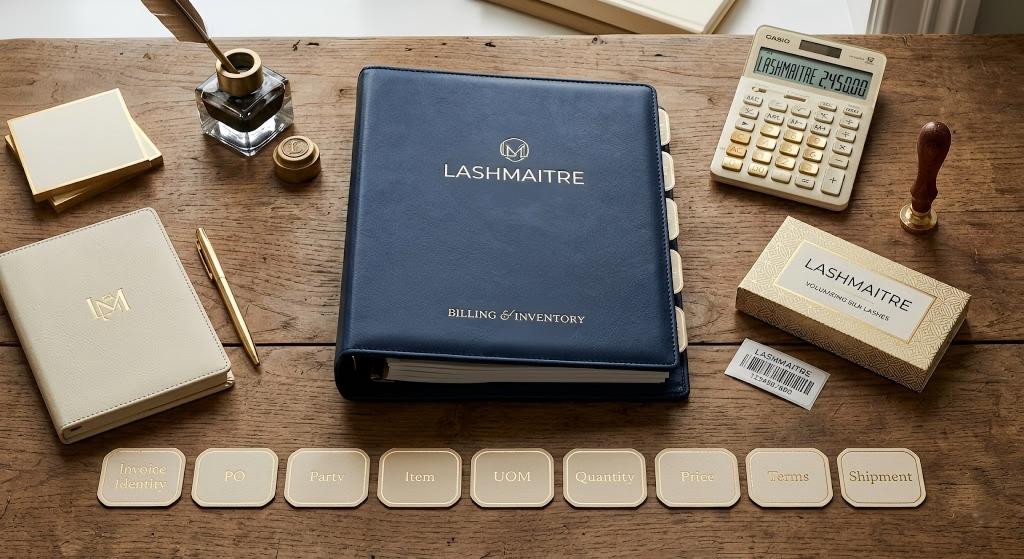
| Check | What must agree | Typical failure |
|---|---|---|
| 1. Invoice identity | Unique invoice number, invoice date and version | Duplicate or corrected invoice reuses an old number |
| 2. Purchase order | Retailer PO and release reference | Wrong PO or obsolete PO version |
| 3. Supplier and ship-to | Vendor identity, bill-to and receiving location | Invoice points to a different DC or supplier account |
| 4. Item identity | Retailer item, supplier SKU and GTIN/UPC mapping | Correct product billed under the wrong pack-level identifier |
| 5. Unit of measure | Each, inner pack, case or display | Cases shipped but eaches billed, or the reverse |
| 6. Quantity | Quantity shipped, accepted and billable | Full PO billed despite a partial shipment |
| 7. Price and allowances | Contract price, discounts, allowances and charges | Old cost or unsupported charge appears |
| 8. Terms and totals | Payment terms, currency, tax where applicable and total | Line extensions do not reconcile to total due |
| 9. Shipment references | ASN, BOL/POD, carrier or receipt reference | Invoice cannot be tied to the physical delivery |
1. Control the Invoice Number and Version
Assign a unique invoice number and preserve the original transmission. If a retailer requires a corrected invoice, follow its cancellation, replacement or credit process instead of silently overwriting the first record. Store the reason, approver, submission time and acknowledgement under one case file.
Duplicate invoice identities can trigger automatic rejection or make later deductions difficult to trace. The accounting team should be able to distinguish original, corrected, credited and resubmitted versions without opening email chains.
2. Match the Current Purchase Order
Use the retailer's current PO number, release and line references. Compare the invoice with the final accepted order—not the first order received if a change occurred. The lash order acknowledgment guide helps control what was accepted before production.
If price, quantity, destination or delivery dates changed, resolve the PO first. An invoice should not be used to force a commercial change the retailer never approved.
3. Verify Parties and Receiving Location
Confirm the supplier account, bill-to entity, ship-to location and retailer distribution center. Similar facility names and store/DC codes can cause an otherwise correct shipment to be matched against the wrong receiving record.
Keep vendor number, location codes and legal entity data in the approved retailer profile. Do not retype them from an old invoice template when the current PO already provides the controlling values.
4. Map the Retailer Item to the Correct Pack Level
Invoice identity must match the level the retailer ordered and received. A lash tray, inner pack, assortment and master case can each have different identifiers. Use the approved lash retailer item setup and lash case pack configuration as controlled references.
For private-label products, confirm that the retailer item belongs to the released artwork, brand, tray specification and GTIN version. A visually identical box may still be a different trade item in the retailer's system.
5. Lock the Unit of Measure
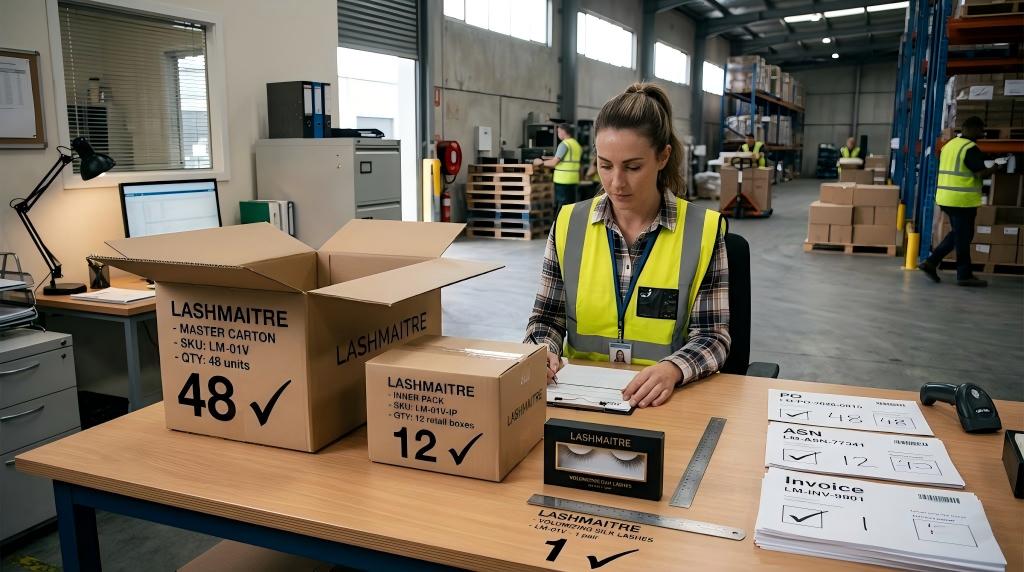
Write down whether each invoice line is expressed in eaches, inner packs, cases or displays. Reconcile the conversion factor to the PO and physical case. If one master carton contains four inner packs of twelve units, the invoice logic must not accidentally bill 48 cases.
Unit-of-measure errors often look like quantity shortages. Keep the UOM and conversion visible in the release packet so warehouse and accounts receivable teams use the same interpretation.
6. Bill Only the Supported Quantity
Compare the invoice quantity with the final packing result and accepted lash advance shipping notice. For split, short or backordered shipments, apply the retailer's billing rule instead of invoicing the full PO by habit.
Build a simple reconciliation by PO line: ordered, acknowledged, shipped, ASN quantity, delivered/received when available, previously invoiced and current invoice quantity. Exceptions should have a named owner before transmission.
7. Reconcile Price, Allowances and Charges
Use the negotiated price effective for the PO. Check promotional allowances, freight terms, discounts and any approved charge separately. Do not add a freight or handling amount merely because it appeared on another customer's invoice.
If the retailer's system shows a different cost, preserve the PO, agreement and correspondence. Decide whether to correct the master data, obtain a PO update or accept a documented adjustment before billing.
8. Recalculate Terms and Totals
Recalculate line extensions, allowances, charges and the total invoice amount. Confirm currency and payment terms. If tax applies, use the retailer's agreed process and qualified accounting guidance; this operational checklist is not tax advice.
One person or automated rule should verify that the sum of billable lines agrees with the transmitted total. Retain the validation report with the invoice version.
9. Link the Invoice to Shipment and Receipt Evidence
Reference the ASN, carrier shipment, BOL or POD when the retailer specification permits or requires it. The link should make it possible to retrieve the PO, packing record, carton labels, ASN acknowledgement and delivery evidence without guessing.
The invoice does not prove that goods were received. It should connect to the evidence that does. This distinction matters when a retailer later reports goods billed but not shipped, a shortage or a timing mismatch.
PO–Shipment–Invoice Release Rule
Release the invoice only when all four statements are true:
- The invoice references the current accepted PO.
- Item, UOM and quantity match the final shipment and ASN.
- Price, allowances, terms and total match the approved commercial record.
- Shipment evidence can be retrieved under the same PO/invoice case file.
If any statement is false, place the invoice on hold and assign an owner. Transmitting quickly is not useful if the document will fail automated matching.

Lash EDI 810 Invoice FAQ
Is an EDI 810 the same as a purchase order?
No. The retailer normally sends a purchase order; the supplier sends an invoice requesting payment. The invoice should reference and agree with the accepted order.
Should an invoice quantity equal the PO quantity?
Only when the full ordered quantity was shipped and is billable under the retailer's rules. Partial, cancelled or backordered lines may require different invoice treatment.
Why can a valid EDI file still be rejected?
Syntax validation confirms message structure. Retailer systems may separately reject or hold the invoice because PO, item, UOM, price, quantity, location or receipt data does not match.
Which document should control the invoiced price?
Use the current retailer-approved commercial record, commonly the final PO and applicable agreement. Resolve discrepancies before invoicing.
How does this reduce chargebacks?
It prevents avoidable mismatches between the invoice, PO, ASN, case pack and receiving record—the evidence chain used in lash retail chargeback prevention.
Next Step
For a retail-readiness review, send the current PO, item mapping, accepted ASN, receipt context and invoice requirements through the wholesale lash extensions inquiry page. Connect billing controls with LASHMAITRE lash quality control and private label lash extensions records before the first retail invoice.
Before the first retail invoice is transmitted, use approved lash extension samples to confirm the product, tray and packaging references behind the item and price data.

Lash Maitre: Your Trusted Partner in Eyelash extension Solutions
Lash Maitre is dedicated to providing professional insights and tips in the eyelash extension industry. Sharing the latest trends, techniques, and product knowledge, Lash Maitre helps lash artists and enthusiasts enhance their skills, stay inspired, and achieve the perfect lash experience.