Post Summary Correction for Lash Imports: 8 Records Before Filing

Share
A lash post summary correction should begin with a controlled discrepancy file, not an edited copy of the entry summary. Preserve the accepted entry version, identify the exact field and line in question, assemble source evidence for classification, origin, value, quantity, and duty impact, obtain internal authorization, and route the correction through the licensed customs broker or other authorized filer. Keep the final ACE result with the original record.
This guide is an operational evidence checklist, not legal advice. Eligibility, timing, entry type, liquidation status, and filing authority can affect the available process. Confirm the current requirements for the specific entry with U.S. Customs and Border Protection (CBP), a licensed customs broker, or trade counsel.
Lash Post Summary Correction Direct Answer
CBP's ACE training and reference guides include Post Summary Correction resources. CBP's Entry Summary Create/Update guidance provides current ACE implementation information, while CBP's entry-summary process slides explain that a PSC is an electronic correction that replaces the prior entry-summary data version for eligible entries before liquidation under the applicable rules.
Use current CBP materials and broker guidance to frame any potential CBP Post Summary Correction or ACE PSC discussion; do not treat an internal working file as evidence that a filing has occurred.
The importer should not decide from a checklist alone that a PSC is available. It should prepare a complete evidence package, then ask the broker to confirm the correct remedy and current filing window.
A lash post summary correction package is therefore an evidence-and-authorization file first; it becomes a filing only when the authorized filer confirms the applicable process and submits it.
When a Lash Importer May Find an Entry Discrepancy
Common review triggers include an HTS code that differs from the approved classification, an unsupported country of origin, a value that does not reconcile to the commercial file, incorrect quantity or reporting unit, a missing adjustment, or an entry line linked to the wrong product.
Finding a difference does not automatically prove the filed entry is wrong. The first task is to reproduce both versions and identify the source of the conflict. The broker may have information, CBP instructions, or transaction treatment that is not visible in the purchasing file.
Eight Records to Prepare Before a PSC Discussion
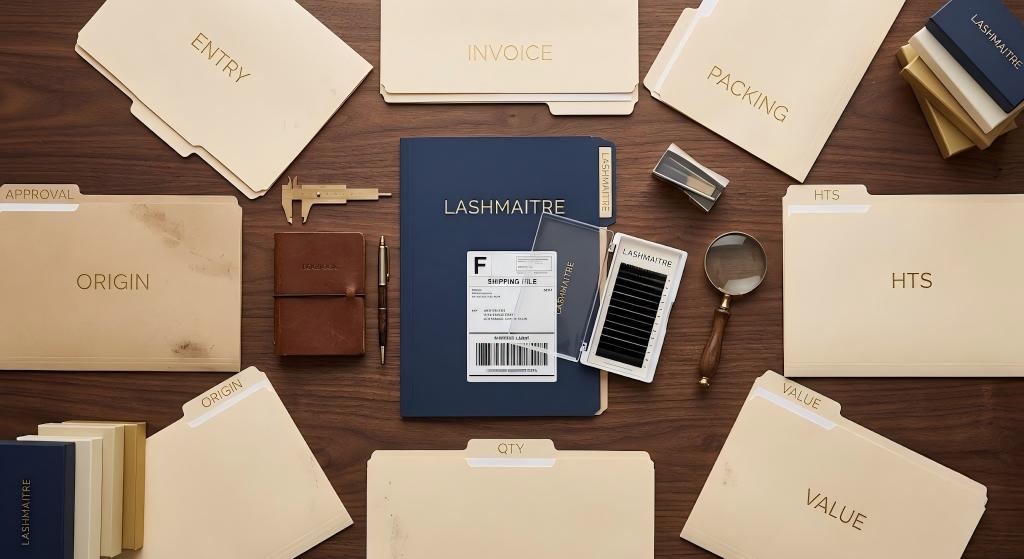
Use the following eight records to make a lash post summary correction review reproducible for the importer, broker, compliance owner, and finance reviewer.
| Record | Purpose | Minimum control |
|---|---|---|
| 1. Accepted entry version | Establishes what was filed | Preserve original file and entry number |
| 2. Discrepancy statement | Names the exact issue | Field, line, filed value, expected value |
| 3. Commercial documents | Supports transaction facts | Invoice, PO, packing list, terms |
| 4. Product evidence | Supports identity and classification | Specs, materials, construction, photos |
| 5. Origin evidence | Supports manufacturing origin | Supplier and manufacturing records |
| 6. Value and quantity bridge | Reproduces calculations and units | Currency, adjustments, conversion logic |
| 7. Impact and approval | Controls duty/payment and authority | Finance/compliance review and decision |
| 8. Filing and closeout file | Proves final action and result | Broker confirmation, ACE version, payment |
1. Preserve the Accepted Entry Summary
Save the entry summary or electronic data version exactly as received. Record the entry number, entry date, importer, broker, and file-received date. Do not overwrite it with a revised PDF or rename a correction as “final” before the broker confirms the official result.
The CBP Form 7501 entry summary checklist can be used to review importer identity, dates, classification, origin, value, quantities, and duties in a repeatable sequence.
2. Write a Precise Discrepancy Statement
Describe one issue at a time:
- Entry number and line.
- Field being questioned.
- Filed value or code.
- Expected value or code.
- Source record supporting the expectation.
- Date discovered and reviewer.
Avoid vague messages such as “the customs form looks wrong.” A precise statement lets the broker reproduce the issue and determine whether a correction is appropriate.
3. Assemble the Commercial File
Include the purchase order, supplier confirmation, commercial invoice, packing list, freight terms, payment records, credits, and relevant correspondence. Freeze the versions that existed at entry time and separately identify documents created later.
For private-label lash orders, connect product charges, custom packaging, plates, samples, tooling, freight, and credits to the valuation review. The lash customs value declaration guide provides a reproducible value-file structure.
4. Assemble Product and Classification Evidence
Product names such as “volume lashes” or “premium trays” are not enough. Include fibers or materials, construction, format, intended use, tray count, packaging configuration, photographs, approved lash samples, and the reasoning behind the classification record.
Use the lash HTS classification evidence checklist to distinguish the actual imported articles and avoid applying one code to dissimilar products.
5. Document Country of Origin
Keep supplier declarations, manufacturing records, approved packaging marking, and any relevant product-level evidence. Separate country of manufacture from supplier address, shipping country, or consolidation point.
If the origin shown on the package, commercial invoice, and entry does not match, place the discrepancy on hold until the underlying manufacturing facts are established.
6. Build Value and Quantity Bridges
For value, show the invoice currency, line value, adjustments, relevant charges or credits, exchange-rate basis used in the file, and the amount reported. For quantity, show purchase units, package size, carton count, total pieces or trays, and the reporting unit.
A bridge should let another reviewer reproduce the filed and proposed figures without verbal explanation. Highlight assumptions and unresolved differences rather than forcing the numbers to balance.
For a lash post summary correction, retain the bridge that was actually reviewed and identify any later revision by date and owner.
7. Record Impact and Internal Authorization
Estimate the possible effect on duties, fees, finance accruals, inventory cost, and supplier recovery, but label the calculation as provisional until the broker confirms the treatment. Assign compliance and finance approvers.
The importer should control who may authorize a correction request and who receives any payment or refund information. A broker question, internal approval, and official filing are three separate events.
8. Retain Filing Confirmation and Closeout
If the broker determines that a PSC or another process is appropriate, retain the submission confirmation, resulting entry version, reason codes or explanation supplied by the filer, CBP messages, payment impact, and final internal approval. Keep both the original and corrected versions.
Close the lash post summary correction file only after the final result, payment effect, approvals, and corrective action are linked to the preserved original record.
The lash import recordkeeping guide provides a structure for ownership, storage, retention, and retrieval testing.

A Controlled PSC Escalation Process
Treat each lash post summary correction as a controlled escalation with named decision owners and retained outputs.
| Decision owner | Question controlled | Output |
|---|---|---|
| Importer reviewer | What exact field and evidence conflict? | Discrepancy statement |
| Customs broker | Is a PSC available and what rules apply? | Filing recommendation |
| Compliance / finance | Is the action and impact authorized? | Written approval |
| Records owner | Was the final ACE result received and retained? | Closed version-controlled file |
- Detect: reviewer identifies a specific entry-line difference.
- Preserve: original entry and source records are frozen.
- Reproduce: filed and expected values are rebuilt independently.
- Support: commercial, product, origin, value, and quantity evidence is attached.
- Assess: broker confirms whether the entry is eligible and which process applies.
- Authorize: internal compliance and finance owners approve the action.
- File: authorized broker or filer submits the applicable transaction.
- Verify: importer receives and reviews the final ACE result.
- Prevent: upstream product, invoice, or broker-instruction controls are corrected.
Do not promise that a correction will be accepted or produce a refund. The purpose of the internal workflow is to create complete, accurate evidence and a controlled decision trail.
What a PSC File Should Not Contain
- A manually edited “official-looking” entry summary used as proof of filing.
- Unsupported classification or origin conclusions copied from a supplier invoice.
- Quantity conversions without pack-size evidence.
- A payment request with no entry number or broker confirmation.
- Deleted original versions.
- A correction request sent by an unauthorized employee.
- A deadline assumption copied from an old slide deck without current broker confirmation.

Post Summary Correction FAQ
Who can file a Post Summary Correction?
PSC filing is customs business conducted through the applicable ACE process. The importer should ask its licensed customs broker or other authorized filer to confirm filing authority, entry eligibility, and the current requirements for the specific transaction.
Can an importer correct Form 7501 by editing the PDF?
No. An internal annotation can help describe the discrepancy, but it is not an official correction. Preserve the accepted version and retain the broker or ACE confirmation for any official change.
What evidence is most important for a lash entry correction?
The lash post summary correction evidence depends on the disputed field. Classification needs product construction and use; origin needs manufacturing support; value needs the commercial and adjustment trail; quantity needs pack and reporting-unit conversions. Every request should also identify the exact entry line and filed value.
What if the entry is not eligible for a PSC?
Do not improvise another remedy. Ask the broker or trade counsel which process, if any, is available based on entry type, timing, liquidation status, and the nature of the issue. Record the advice and decision.
Conclusion: Build the Evidence Before Requesting a Correction
A Post Summary Correction for lash imports should be the result of controlled evidence review. Preserve the original entry, define the discrepancy, support product and transaction facts, authorize the action, and retain the official result. Then fix the upstream specification, invoice, quantity, or broker-instruction problem before the next shipment.
Use LASHMAITRE lash quality control to keep product identity and evidence consistent from samples through shipment. For a documented private-label order and import file, contact LASHMAITRE.

Lash Maitre: Your Trusted Partner in Eyelash extension Solutions
Lash Maitre is dedicated to providing professional insights and tips in the eyelash extension industry. Sharing the latest trends, techniques, and product knowledge, Lash Maitre helps lash artists and enthusiasts enhance their skills, stay inspired, and achieve the perfect lash experience.